
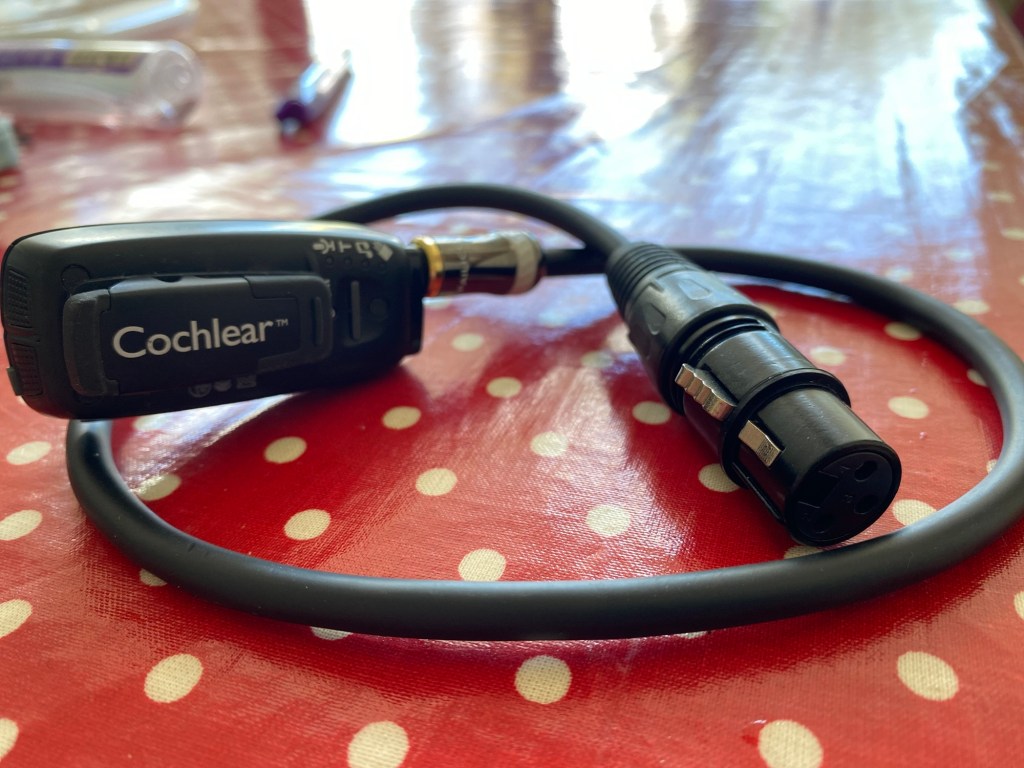
I’ve had amazing experiences at gigs over the past few years. This is the request that I send to promoters before gigs to ensure accessibility. These steps work for my current setup (Cochlear Nucleus 8 Processor connected wirelessly to a MiniMic 2+ streaming device). Other brands of cochlear implants or hearing aids will have equivalent functionality that should facilitate similar outcomes.
Reasonable Accommodation for Cochlear Implant Users at Live Events
This document outlines a simple, cost-free process to make live music events accessible for people with cochlear implants or compatible hearing aids. Providing this accommodation ensures compliance with equality legislation and promotes inclusivity in the arts.
Summary of Accommodation
To make a gig accessible, the attendee needs a direct audio feed from the sound desk to their cochlear implant via a wireless battery-powered streaming device. This improves sound quality, removes crowd noise, and allows volume control.
Technical Requirements
XLR output from the sound desk→
Attendee’s XLR-to-3.5mm cable→
Wirelessly streamed to cochlear implant processor (and compatible hearing aids)
Latency & Delay:
Apply the same delay used for headphones at the sound desk if required.
Some setups have inherent delay- adjust as needed.
MiniMic Placement:
The range of the MiniMic2+ is limited and relies on a clear line of sight. Keep the MiniMic as close to the attendee as possible.
Ideally, mount it high (e.g., on rigging) to avoid obstruction by crowds.
Alternative solutions such as the Cochlear TV Streamer have a broader range, but require power.
If the promoter can facilitate the attendee getting close to the sound desk, that will reduce connection issues.
If No Spare XLR Output is available:
Use an XLR/microphone splitter.
If a splitter is unavailable, identify an alternative output (e.g., headphone jack and use the attendee’s y-splitter ).
Important Note on Wi-Fi Audio Solutions
Systems that broadcast sound over Wi-Fi (e.g., Sennheiser Audio Connect) are not suitable for cochlear implant users. These solutions introduce extreme latency, making them unusable for real-time listening and causing significant audio delay that disrupts the experience.
Best Practices
Respond promptly to accommodation requests.
Ensure the sound engineer receives clear instructions well before the event.
Keep a splitter available for situations where all XLR outputs are occupied. This will also help meet multiple accommodation requests with different brands of cochlear implants or hearing aids.
Note: The MiniMic 2+ can stream to up to 99 compatible devices.
Consider future-proofing with Bluetooth Auracast for broader accessibility.
Why This Matters
This process is quick, easy, and costs nothing. It ensures equitable access for attendees with hearing loss and aligns with the principle of inclusivity by design.

 noisy silence